Apple provides a set of tools for working with dates in our apps. Foundation provides the primitive types, calendar operations, and localized formatters, and both macOS and iOS provide UI components for viewing calendars and picking dates and times. They are well-built, usable, and cover typical app needs very well. But there are limits.
TimeStory is often used by people to capture historical and even prehistorical dates. Importantly, it needs to do a lot of date computation, not just holding Date values and mapping them to and from localized strings. Depending on what you’re doing, with ancient enough dates, the Apple SDK ranges from incomplete to nonfunctional. And some of those limits only became obvious after trial and error. Every one of the rough edges below has come up during feature development or in the form of a customer bug report.
The 4713 BC lower limit in Foundation
Foundation’s date-handling code has an effective lower bound around January 1, 4713 BC on the Julian calendar. You can create a Date value representing an instant in time below that limit, but many Calendar methods will return unexpected values when you try to do anything with it. For example:
// Tested on Swift 6.3 as shipped in Xcode 26.4
import Foundation

let cal = Calendar(identifier: .gregorian)
let fiveThousandBC = cal.date(from: DateComponents(era: 0, year: 5000))!
print(fiveThousandBC.formatted(.dateTime.year()))
    // -> correctly prints "5000"

let oneYearLater = cal.date(byAdding: .year, value: 1, to: fiveThousandBC)!
print(oneYearLater.formatted(.dateTime.year()))
    // -> incorrectly prints "4712"!
Many other attempts to work with date components or perform date arithmetic will fail, sometimes in inconsistent ways. The specific details vary, and have changed over Foundation’s evolution, but this has been true for a while. (I discovered this during the early days of TimeStory because a timeline’s layout would be completely wrong when you scrolled that far to the left. It obviously needs to do date computations to place gridlines and map out the X axis.)
It’s worth stating the obvious here: in nearly every case, when talking about events six thousand years ago, they’re going to be approximate years at best, not precise calendar dates. But the example code above only deals in years, and something as simple as adding one year gives the wrong answer. If you want to write code that can handle both modern dates and ancient years, you need to implement a cutoff beyond which your code no longer uses the Date or DateComponents types.
January 1, 4713 may seem like an arbitrary date, but it is significant in many computer date math systems. It’s day 0 in the Julian day number system, a way of mapping any historical calendar date to a single integer, with a number of known algorithms around it. (That link goes to Peter Meyer’s site, full of interesting stuff about calendars and date math, if you’re into that.)
The 1 AD lower limit in UIDatePicker
AppKit gives us NSDatePicker, UIKit gives us UIDatePicker, and SwiftUI just wraps up whichever of those applies. They’re solid components, and you should use them, as the design matrix underlying a date picker is massive: localized calendars, user calendar preferences, UI language, type size, accessibility, and more. And NSDatePicker does okay with BC dates.
UIDatePicker, however, simply cuts off at AD 1. (Although it’s showing you dates on the Julian calendar by that point, Julius himself is completely out of reach!) There is no workaround for this other than writing your own replacement calendar picker, which I just said you should not do. (But if you do, it is incredibly instructive.)
Limitations in Era Formatting
When formatting or parsing dates, there is no way to override the built-in era symbols (like “BC” and “AD”) or, in locales where multiple conventions are in use, to choose among them. While other date symbols, like weekday and month names, tend to have firmly-established formats and abbreviations, eras, which we don’t use every day, vary a bit more.
For example, the English language has two conventions for eras. “BC” and “BCE” mean the same thing, and “AD” and “CE” mean the same thing, and different people and communities choose one or the other. BC and AD are traditional, while BCE and CE avoid their religious associations. But in the US English locale, BC and AD are all you get, and all that will parse.
(Also, traditionally, English puts the era symbols in different places: “100 BC” vs. “AD 100”. This is totally unsupported by DateFormatter, but I’d argue less of an issue, as modern usage often writes “100 AD”.)
In other languages, I’ve heard from customers that the built-in formats are not ideal. In French, for example, for BC, DateFormatter will only use or recognize the syntax “av. J.-C.”, with that punctuation and spacing. This is inconvenient to type. There’s no way to tweak DateFormatter to allow variations or alternate forms, or even to parse ignoring punctuation.
The only workaround is app code getting involved in parsing and formatting date strings, a challenging proposition in an app that supports multiple localizations.
The Fixed Gregorian Transition
The Gregorian calendar is the common 12-month solar calendar. It was a corrected replacement for the much older Julian calendar, which looked basically the same but had leap years a bit too often, causing a given day like January 1 to slowly drift later and later in the seasons.
The new calendar was designed by the Catholic Church, and Pope Gregory XIII declared it to be in effect in 1582 on the day that the old calendar called October 5 but the new calendar now called October 15, skipping ten day numbers to make up for that drift.
Foundation.Calendar(identifier: .gregorian) follows this rule unconditionally:
// Tested on Swift 6.3 as shipped in Xcode 26.4
import Foundation
let cal = Calendar(identifier: .gregorian)

let lastJulianDate = cal.date(from: DateComponents(year: 1582, month: 10, day: 4))!
print(cal.component(.day, from: lastJulianDate)) // prints 4

let firstGregorianDate = cal.date(byAdding: .day, value: 1, to: lastJulianDate)!
print(cal.component(.day, from: firstGregorianDate)) // prints 15
And here’s how it looks in a date picker control, taken in the Reminders app, which thankfully lets us set timed reminders for centuries ago:
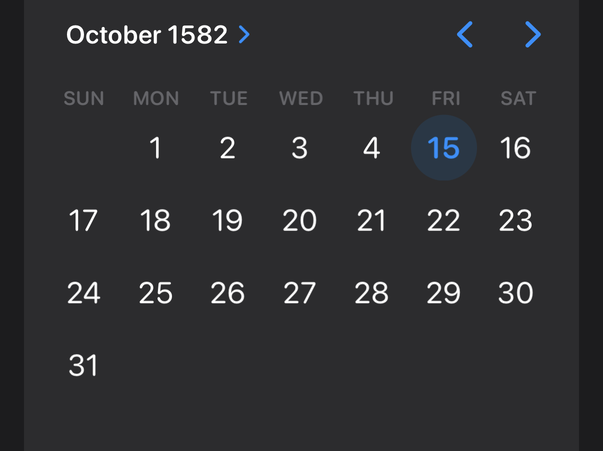
But many places adopted the Gregorian calendar later, sometimes much later. Non-Roman-Catholic countries were in no hurry to follow the Roman Pope’s instructions. For example, the British Empire officially adopted it almost two centuries later, in 1752; if you look at English-language historical records around that time, you’ll often see the terms “N.S.” (New Style) and “O.S.” (Old Style) attached to dates to make it clear which calendar was used.
It would be nice if I could allow users to configure the transition date, and have all DateComponents conversions follow it, but Foundation offers no such public API, so app code must make appropriate adjustments.
(For going to and from strings, the older DateFormatter type does have such a property defined, but it wasn’t carried forward into the newer Date.FormatStyle API, and it obviously doesn’t affect DateComponents conversions.)